
UniFi Networking
Business Wi-Fi and wired networks built on UniFi — designed, installed, and managed so coverage is strong, roaming is seamless, and the rack stays clean.
What's Included
- UniFi gateways, switches, and access points, built to one written standard
- Planned with UniFi Design Center and confirmed with an on-site Wi-Fi survey
- Separate networks (VLANs) for staff, voice, cameras, smart devices, and guests
- Intrusion prevention (IPS/IDS) at the gateway
- Voice traffic prioritized so calls stay clear
- Backup internet options — 5G/LTE cellular, a second ISP line, or Starlink — plus multi-site links
- UniFi Protect cameras on the same platform
- Checked regularly — every change documented
Gateways, Routing and Switching
Every network we build is built on Ubiquiti UniFi and follows the same written standard, so each site is set up the same way and is easy to support.
Gateway and Firewall
The UniFi gateway routes your internet and enforces the rules between your networks. Traffic between networks is blocked by default, and we open only the paths your business actually uses.
Intrusion Prevention (IPS/IDS)
Threat detection and blocking at the gateway, on gateway models that support it.
On-Site UniFi Console
Each site runs on its own UniFi console on-site, so the network keeps working even if the internet or the cloud portal is down. Configuration backups run automatically.
Switching by Role
Switch ports are set from one profile per role — staff, phones, cameras, uplinks — instead of being edited one at a time. Changes stay consistent and easy to check.
Unused Ports Shut Off
Ports nobody is using are parked on a dead network. A cable plugged into the wrong jack does not land on your business network.
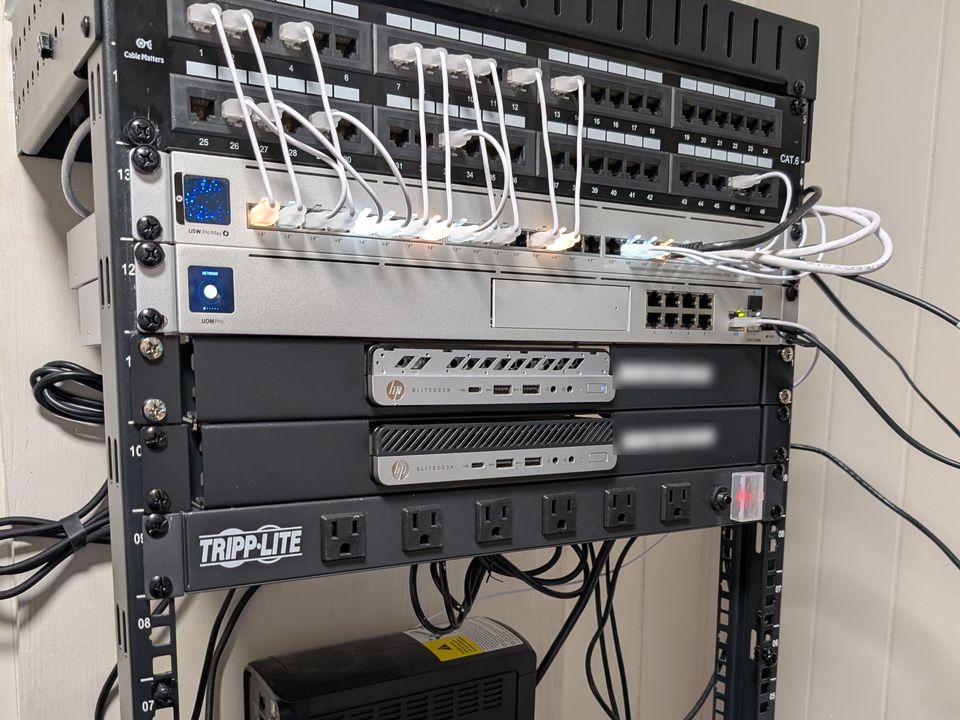
Clean Rack Standards
Structured cabling and organized server racks. A clean rack is a reliable rack.
Separate Networks for Separate Jobs
We split each site into virtual networks (VLANs) by job, so a problem on one network stays on that network.
Business Data
Staff computers, printers, and shared files sit on their own trusted network.
Voice
Desk phones get their own network so calls are easy to prioritize and troubleshoot.
Cameras
Cameras talk to the recorder and nothing else on your business network.
Smart Devices (IoT)
TVs, thermostats, and similar devices reach the internet but cannot start connections into your business network. Our standard setup lets staff cast to a conference room TV while guests can't.
Guest
Guest Wi-Fi is internet only, separated from everything else, with a limit so guests cannot use up your bandwidth.
Card Terminals (Optional)
Where possible we recommend cellular card terminals, which keep card data off your network entirely. If a terminal has to be wired in, it gets a locked-down network of its own that talks only to the card processor.
Voice Traffic Comes First
Our business phone systems run on 3CX, and our standard build includes network settings that protect call quality.
Calls Get Top Priority
Phone and phone-system traffic goes to the front of the line on your internet connection, so a large download does not break up a call.
Guests Go Last
Guest Wi-Fi gets a total limit and a per-device limit, so one visitor cannot slow down your staff or your calls.
Tuned to Your Line
We measure your internet speed and set traffic shaping to match — and check the result with a call placed during a speed test.
Backup Internet, Multi-Site, Cameras and Access
Backup Internet (Optional)
A backup connection is an option, not a given — and it can come from more than one kind of provider. Some clients add a 5G or LTE cellular line; others bring in a second ISP line, or Starlink. Where a backup is in place, our standard build fails over business traffic but not guest Wi-Fi, so a slow or data-capped backup line is kept for the work that matters.
Connecting Your Locations
For businesses with more than one location, UniFi Site Magic SD-WAN can link offices that run UniFi gateways, with only the networks that need to cross between sites.
Secure Remote Access
Staff who need to reach the office from outside use an encrypted VPN that reaches only the systems they need. We do not leave admin logins or remote desktop open to the internet.
Security Cameras and Recording
UniFi Protect cameras record to a recorder at your site, not to a paid cloud service. Cameras are wired wherever possible and sit on their own network.
Door Access and Intercom (On Request)
UniFi Access door readers and intercoms are available on request. Running them on the same console as your cameras lets door events link to video.
Checked Regularly, Documented Always
We regularly review each managed site for devices offline, outages and failovers, blocked threats, and logins or changes not made by us. Every site gets an as-built document and a living inventory, and every change is logged with the date and who approved it. Only the admins who need access have it, with multi-factor sign-in required.
UniFi gateways, switches, and access points are covered systems under our Technology Assurance tiers.
Common Questions
Why UniFi for a business network?
UniFi gives business-grade Wi-Fi, switching, and gateway management in one system — strong coverage and central control without enterprise complexity. Every network we build follows the same written standard, so each site is set up the same way and is easy to support.
Can you fix our existing Wi-Fi dead zones?
Yes. Good Wi-Fi starts with placement, not settings: we plan access point placement from your floor plan with UniFi Design Center, then walk the space with a Wi-Fi survey app to confirm coverage in the real building.
Do you separate guest and staff networks?
Yes. We split each site into virtual networks (VLANs) by job — business data, voice, cameras, smart devices, and guests. Guest Wi-Fi reaches the internet only; guests can't see your devices or each other.
What happens if our internet drops?
That depends on whether your site has a backup connection — it is an option we can build in, not a given. Clients add backup in different ways: a 5G or LTE cellular line, a second line from another ISP, or Starlink. Where a backup is in place, business traffic fails over to it automatically; guest Wi-Fi doesn't, so a slow or data-capped backup line stays reserved for the work that matters. Talk to us about what fits your site.
Can cameras run on the same system?
Yes. UniFi Protect cameras record to a recorder at your site — not a paid cloud service — on their own network, and we watch camera status, recorder storage, and disk health. UniFi Access door readers and intercoms are available on request.
How do you look after the network day to day?
We regularly review each managed site for devices that dropped offline, outages and failovers, blocked threats, and logins or changes not made by us. Each site gets an as-built document and a living inventory, and every change is recorded with the date and who approved it.
Ready to Stabilize IT?
Tell us what you're running today and where it breaks. We'll map a practical next step.
Mon–Sat 9:00 AM – 5:00 PM ET